Samsung WB5500 Camera User Manual, Instruction Manual, User Guide (PDF)

Samsung WB5500 sport a Schneider-KREUZNACH 26x (26-676mm) zoom lens, the 26mm wide-angle is perfect for capturing landscapes or group shots, while the 26x ultra-zoom brings distant subjects up close.  The high resolution 14 MP CCD sensor delivers crystal-clear images with richer colors. The Dual Image Stabilization giving you stunningly sharp images, even in dimly-lit situations.

The WB5500 features Smart Auto 2.0 that uses scene recognition technology chooses from 16 different settings ranging from landscape to portrait automatically, then adjusts for the best shot.

Read moreSamsung WB5500 Camera User Manual, Instruction Manual, User Guide (PDF)

Samsung HZ50W Camera User Manual, Instruction Manual, User Guide (PDF)
Samsung HZ50W boasts a 26x (26-676mm) Schneider-KREUZNACH wide-angle super zoom lens capturing both distant action and candid close-ups with ease. The 13.8 MP CCD sensor delivers sharp, crisp detailed images for poster-sized printing. The Dual Image Stabilization ensures clear, steady shots even in low-light or fast-action scenes.

The HZ50W features Smart Auto Scene recognition technology automatically chooses from 16 different settings ranging from landscape to portrait and then optimizes the camera automatically to ensure the perfect results possible are achieved.

Read moreSamsung HZ50W Camera User Manual, Instruction Manual, User Guide (PDF)

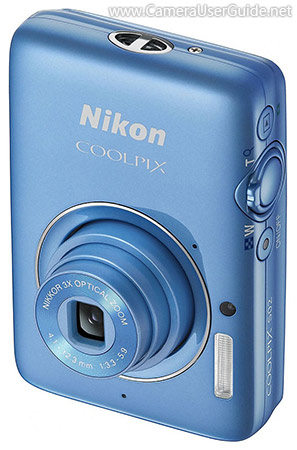
Nikon COOLPIX S02 Camera User Manual, Instruction Manual, User Guide (PDF)

Nikon Coolpix S02

This stylish Nikon COOLPIX S02 is a ultra-mini, ultra-lightweight camera smaller than a credit card and only weigh 100 g (3.6 oz). It sports a 3x (30-90mm) optical zoom lens gives you a great range of popular focal lengths to use for anything from group photos or landscapes, to close-up portraits and zoomed images. The high sensitive 13 MP CMOS sensor offers amazing image quality and enhanced low-light performance.

The COOLPIX S02 features a 2.7-inch LCD touch screen lets you customize menus and focus on a subject by touching the screen.

Read moreNikon COOLPIX S02 Camera User Manual, Instruction Manual, User Guide (PDF)