
Kodak EasyShare M522 PDF User Manual (Owner's Manual, User Guide) provides information and instructions on how to operate the EasyShare M522, including Quick Start Guide, Basic Operation, Advanced Guide, Menu Functions, Custom Settings, Troubleshooting & Specifications of Kodak EasyShare M522.
The pocket-sized View & Download Kodak EasyShare M522 User Manual / Instruction Manual / User Guide in PDF format for free on this post. Kodak EasyShare M522 equipped with a 4x (27-108mm) wide-angle optical zoom lens for group shots as well as close-ups. The 14 MP CCD delivers sharp, brilliant images for stunning large prints. The Digital Image Stabilization reduce blur caused by subject movement or fast-action situations to deliver stunningly sharp pictures.
The EasyShare M522 features Smart Capture automatically identifies the scene and adjusts camera settings for a great picture in just about any environment.
The easy 3-step Internet sharing function makes it simple to share your photos and moviewby uploading to YouTube, Facebook, Flickr, Kodak Gallery and many other websites.
Other highlights include 2.7-inch LCD screen, 16 scene modes, 5 color modes and Face Recognition for great people pictures.
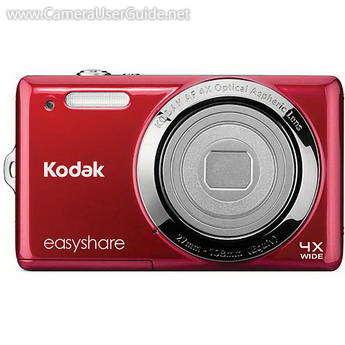
Kodak EasyShare M522 Key Features:
- 14-megapixel CCD
- 4x (27-108mm) Wide-angle Zoom Lens
- Digital Image Stabilization
- 2.7" LCD Screen
- VGA Video
- ISO up to 1000 for Low Light Photos
- 16 Scene Modes
- Intelligent scene detection
- Intelligent capture control
- Intelligent image processing
- Automatic Face Recognition
- Easy-to-Share Internet Upload
Free Download Kodak EasyShare M522 User Manual, User Guide, Owner's Manual, Operating Instructions in PDF file:
Kodak EasyShare M522 User Manual (PDF)
If you need Kodak EasyShare M522 PDF User Manual / Instruction Guide / Owner's Manual in other languages, please feel free to leave your comments at the bottom of this page. ↓↓↓
